Creating children’s videos can become surprisingly complicated. You need a story, scenes, visuals, narration, music, subtitles and editing before you even think about publishing. KidsTale AI is designed to simplify much of that process by bringing several steps into one AI-assisted workflow.
KidsTale AI Review — Quick Verdict
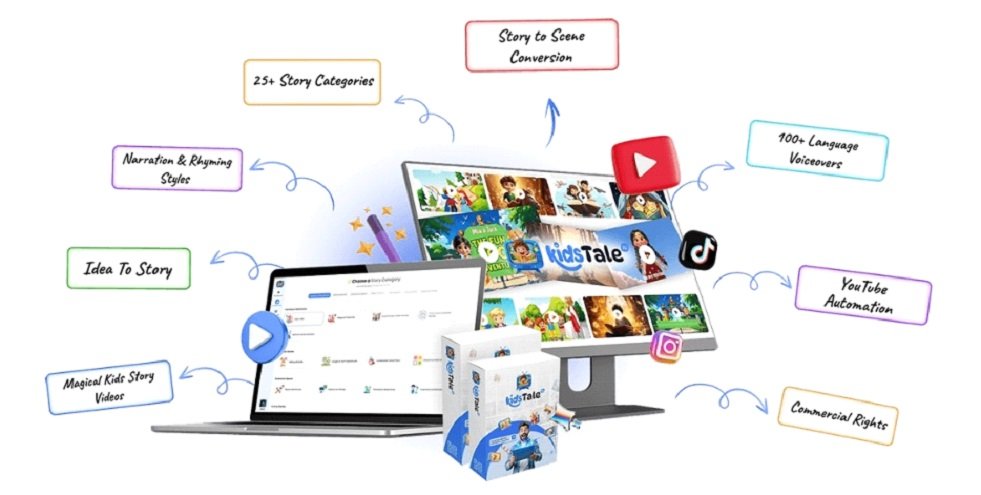
KidsTale AI appears to be a browser-based platform for creating children’s story videos from ideas or prompts. Its positioning covers story generation, scenes, AI narration, music, subtitles, templates and multiple video formats. YouTube auto-posting is also mentioned in the vendor’s support material.
The biggest attraction is convenience. Instead of switching between several tools, creators can potentially handle much of the production process in one place.
However, there is an important catch: automation does not guarantee great content, views or income. Generated videos still need human review and editing.
What Is KidsTale AI?
KidsTale AI is an AI-powered children’s story-video creation tool. The basic idea is simple: provide a story concept or prompt, let the AI help develop the story and scenes, add narration and other audio elements, and prepare the resulting video for publishing.
It is particularly focused on children’s content, including fairy tales, bedtime stories, talking animals, dinosaurs, adventures and moral or educational stories.
How Does KidsTale AI Work?
The general workflow is:
You can begin with your own concept or reportedly use prompts and templates. The AI can then help structure the story and create accompanying scenes. Narration, music, sound effects and subtitles are also part of the described workflow.
Before publishing, I recommend checking pronunciation, story continuity, visuals, music, subtitles, age suitability and licensing considerations.
Key Features
AI Story Generation: Helps turn a basic idea into a children’s story.
Scene Generation: Creates visual scenes to accompany the story, reducing manual production work.
AI Narration: AI-assisted voices can provide narration without requiring separate recording.
Music & Sound Effects: Background audio can be incorporated into the storytelling workflow.
Subtitles: Auto-generated captions can improve accessibility and viewing convenience.
Templates: Ready-made structures can help beginners start projects faster.
Multiple Formats: Public descriptions report portrait, landscape and square formats for different content platforms.
One caution: exact numbers for voices, languages, templates and similar specifications vary between third-party sources, so I would not treat those figures as independently verified.
KidsTale AI Pricing
Pricing requires some clarification. Historical launch information reported a front-end price of approximately $16.97/$17, while the current WarriorPlus listing referenced in the review shows $27. Buyers should verify the live checkout price because offers can change.
Third-party sources also report several optional upgrades, including Unlimited, Traffic, Studio, DFY, Income Maximizer, Agency, Reseller and MegaSuite. These historical funnel details should be checked at checkout rather than assumed to be current.
You probably do not need every upgrade. Start with the base offer and only consider an upgrade if it solves a specific problem in your workflow.
Pros and Cons
Pros
⦁ Focused specifically on children’s storytelling
⦁ Combines multiple production steps
⦁ Beginner-friendly concept
⦁ Supports several reported video formats
⦁ Potential commercial-use applications
⦁ Can reduce tool switching and production time
Cons
⦁ AI-generated content still requires human review
⦁ Feature limits may differ between editions
⦁ Optional upgrades can increase the total cost
⦁ Some numerical specifications are difficult to independently verify
⦁ Not designed to replace professional animation software
⦁ No guaranteed views, subscribers, sales or income
Who Should Consider KidsTale AI?
KidsTale AI could be a good fit for beginners, children’s-content creators, YouTube creators, freelancers and people who want a simpler way to produce story videos.
It is less suitable for professional animators who need frame-by-frame control, advanced compositing or detailed character and movement control.
I also would not recommend buying it with the expectation that AI will automatically build a profitable YouTube channel. The software can assist with production, but audience demand, originality, consistency and publishing strategy still matter.
KidsTale AI vs Alternatives
KidsTale AI differs from products such as AI Viral Kids Stories and AI Video Tales because all are centered around AI-assisted children’s storytelling, while products such as 3D Kids Animation Story and Motion Kid are more focused on ready-made or editable PLR content. TubeKids takes a broader YouTube kids-channel and PLR approach.
So the right alternative depends on your goal. If you want to generate new children’s stories from ideas, KidsTale AI’s model is relevant. If you prefer ready-made assets, a PLR-focused product may be more appropriate.
Is KidsTale AI Legit?
Based on the information reviewed, KidsTale AI has an identifiable marketplace presence through WarriorPlus and is associated with Pranshu Gupta/Bizomart LLC. That supports its status as a real digital product offer.
But legitimate software does not mean guaranteed business success. Claims about income, viral videos or guaranteed subscribers should always be treated separately from the actual product features.
Final Verdict — Is KidsTale AI Worth It?
My verdict is conditionally positive.
KidsTale AI makes the most sense if your main problem is the time and complexity involved in creating children’s story videos. Combining storytelling, scenes, narration, music and subtitles into one workflow could make content production considerably easier.
Its biggest weakness is also its biggest lesson: AI can speed up production, but it cannot replace creative judgment.
For beginners and children’s-content creators, KidsTale AI is worth considering. For professional animators or anyone expecting a push-button passive-income system, I would look elsewhere.
Before buying, verify the current price, included features, refund terms and commercial license at checkout rather than relying on historical information.
Bottom line: KidsTale AI may be a useful production assistant for children’s storytelling, but its value depends on how often you create content and how much human creativity and quality control you are willing to add.